
Changelog
Follow up on the latest improvements and updates.
RSS
new
improved
General
Docs
Search, Filter, and Sort/Group SmartFields
This one's been highly requested - you can now search and filter SmartFields directly within Plannerly.

If you're working on projects with dozens (or hundreds) of SmartFields, finding the right one used to mean a lot of scrolling.
Now you can quickly search by name or filter SmartFields to find exactly what you need in seconds.
This is a big time-saver for teams managing complex scopes and document templates.
Thanks to everyone who suggested this - we heard you and we're excited to ship it!
new
improved
General
Docs
Scope
File Manager
Timeline
Kanban
Verify
Live Dashboards in Docs - No More Export-Import-Update-Repeat
Your model checking data already lives in Plannerly. Now your dashboards do too.
We have added dashboards directly inside the Docs module - charts that pull straight from your Verify tasks and update themselves automatically. No exporting to Excel. No copying numbers into a slide deck. No "let me just update this before the meeting" panic.
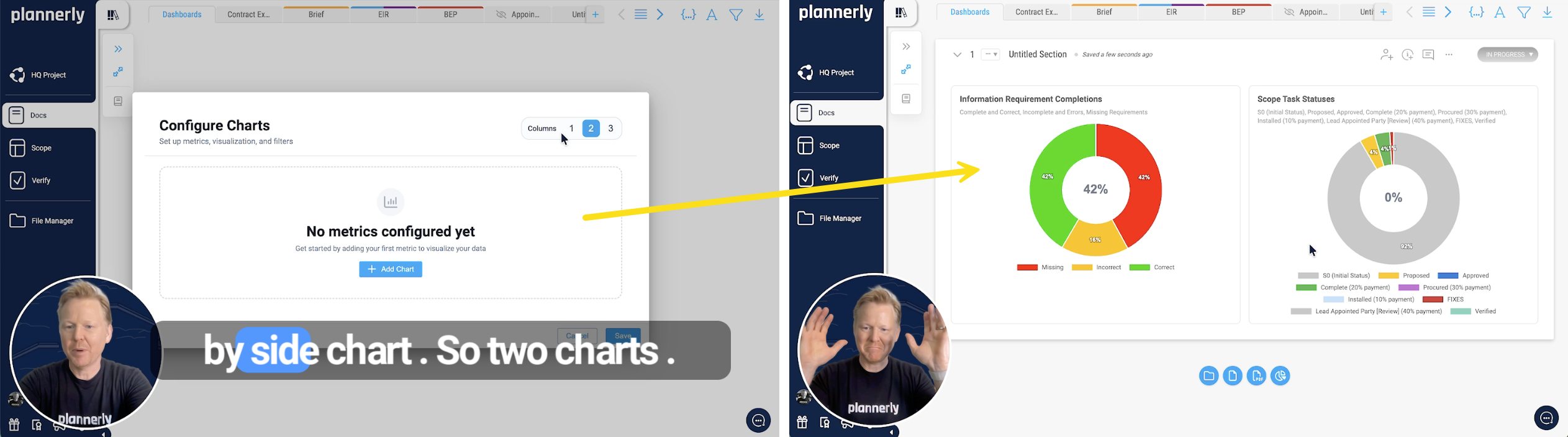
How it works
Create a new document in Docs, add a chart block, and you are done. Seriously - that is it. Choose side-by-side or stacked layouts, pick your chart types, and the data flows in from your existing tasks.
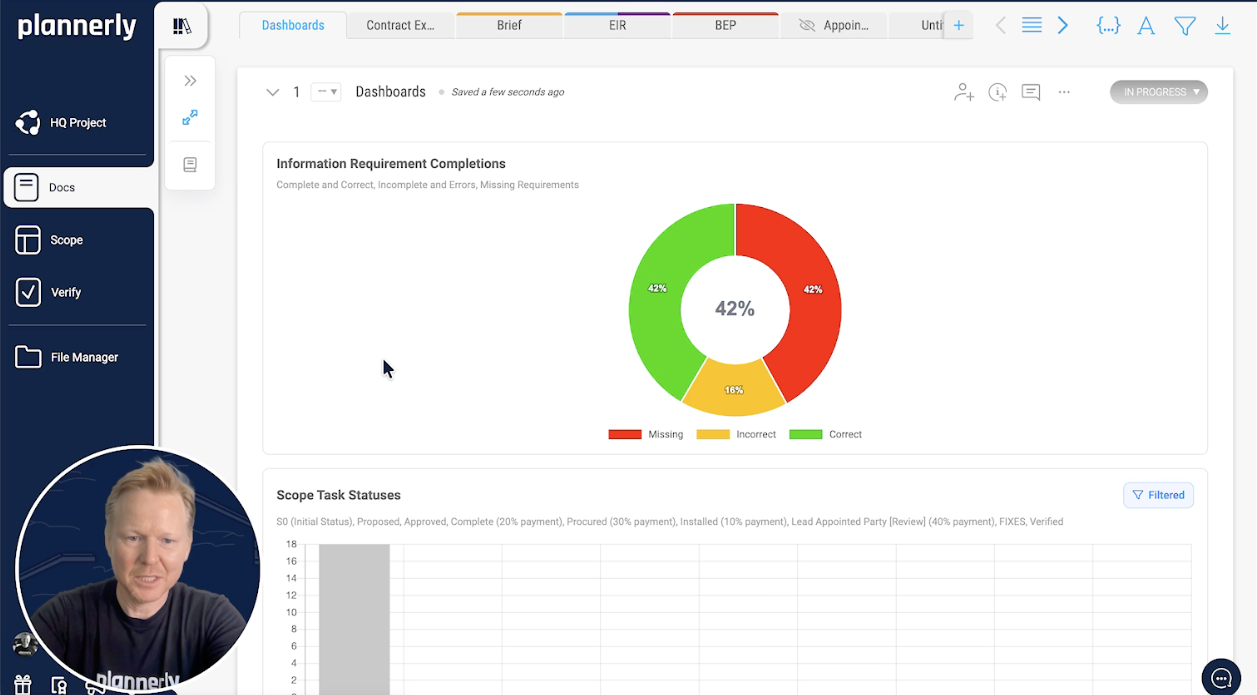
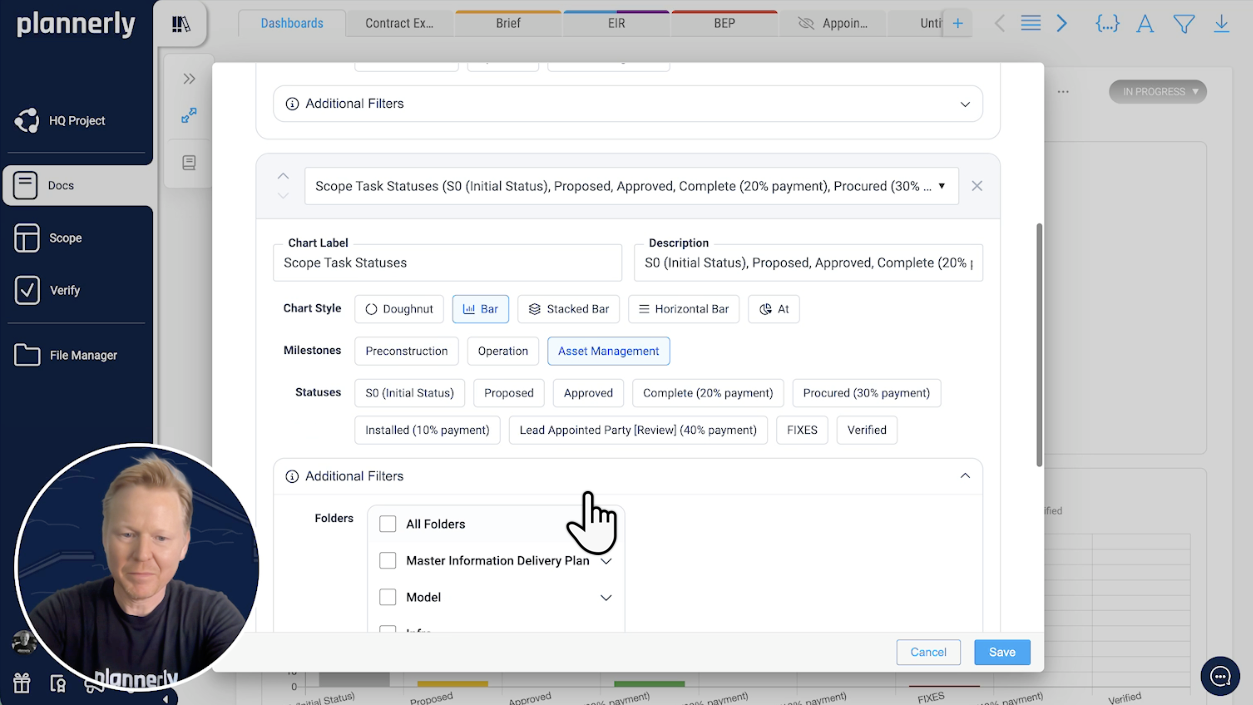
Filter for the right audience
Not everyone needs the same view. Filter your dashboards by milestone, status, team member, or team - then save. Create one dashboard for the project lead showing overall progress, another for the mechanical team showing just their workload. Each one tells a different story from the same data.
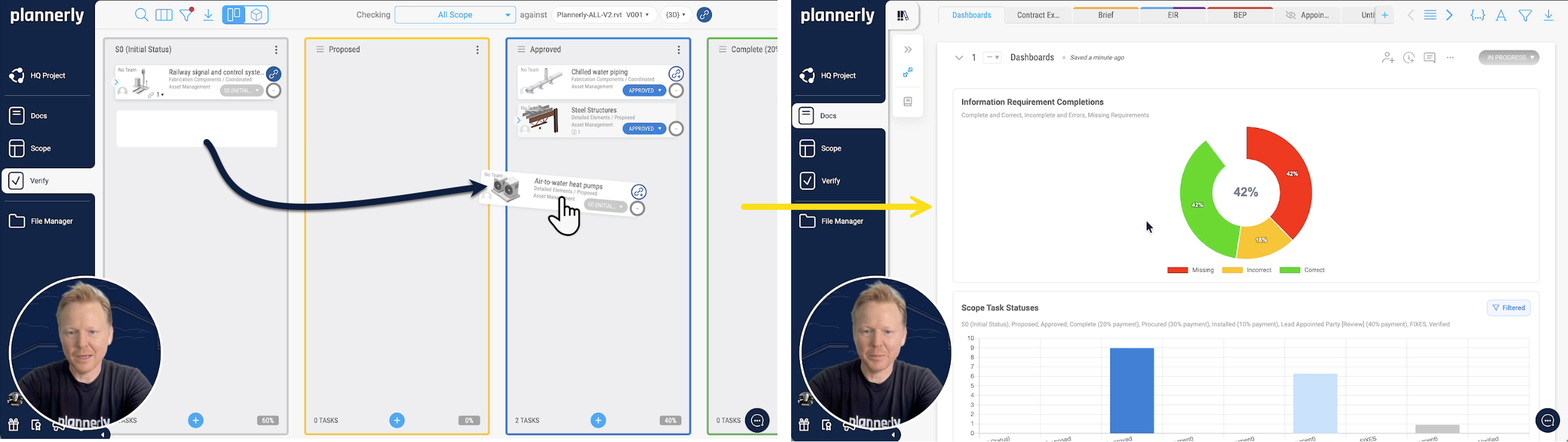
Always up to date - zero effort
This is the bit that kills the old workflow dead. When your team drags tasks across the Kanban board, changes a status, or completes a deliverable - the dashboard updates automatically. Go back to your dashboard and it already reflects what just happened. No refresh button. No re-run. Just current data, all the time.
Automated weekly reports
Set up auto-versioning and schedule a weekly PDF export - say Monday mornings at 9 AM. Pick your recipients, write a brief message, save. That is it. Every Monday your team gets a fresh dashboard report in their inbox and you did not have to do a single thing.
No more exporting to Excel, updating a separate dashboard, converting to PDF, uploading to Teams, and hoping nobody asks for the latest version. It is all one workflow now.
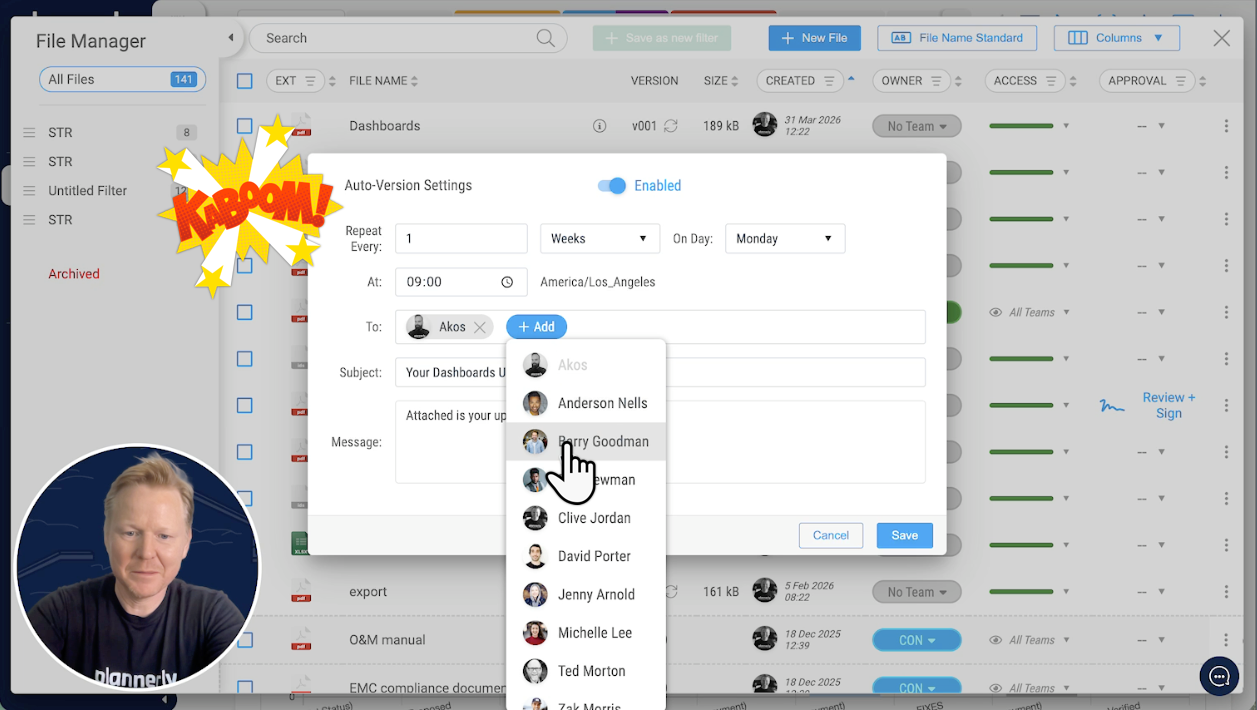
The old way:
Export data → open Excel → build charts → format → PDF → email → repeat next week → cry a littleThe new way:
Add a chart block → done. It updates itself. Forever.new
improved
General
Docs
Scope
Verify
Work Package Filters for Dashboard Charts
You can now
filter Charts by Work Package
- in a single click.If you've already defined Work Packages in your project scope, those same structures now carry straight through to your reporting. No more manually setting up filters for each team, folder, or discipline. Select a work package, and your chart is scoped instantly.

What's new:
- One-click work package filterswhen adding charts in Docs - infrastructure, mechanical, team-specific, or any work package you've defined
- Linked model elementsfor information requirement completions and task/scope task status
- Auto-updating chartsthat stay in sync as your teams make completions - no manual refresh, no re-exporting
- Build on existing scoping work- the work packages you've already set up are now available as chart filters, so you're not duplicating effort
Now the whole setup takes about a minute - and your reports stay current automatically.
If you've already scoped your project with work packages, head to the Docs module and try it out. You can build filtered reports in just a couple of minutes.
new
improved
fixed
General
Docs
Scope
File Manager
Timeline
Kanban
Verify
Small fixes for bSDD, Scope, and printing
We’ve made a few updates to smooth out how bSDD-linked properties, Scope lists, and document exports behave.
This update includes:
- Improved handling of bSDD-linked properties for customer classifications, where expected properties were not always appearing.
- A fix for empty table of contents exports, so the table of contents is now hidden when there are no valid-numbered items to show.
- A fix for missing information requirement chevrons in Scope lists, where expand/collapse controls could fail to appear until a task was opened first.
- A fix for a printing error caused by empty groups, where printing could fail if a group had no child items.
Overall, these changes make day-to-day use a bit smoother across project structure, information requirements, and exports.
new
fixed
General
Docs
Scope
File Manager
Timeline
Kanban
Verify
Workflow, Permissions & Editor Enhancements
We’ve just rolled out a series of improvements to permissions, editor functionality, and AI-assisted content - all designed to make everyday workflows clearer, faster, and more intuitive.
Enhancements include:
- Strengthened permissions handling when Work Packages have not yet been created
- Improved the empty-state dropdown to clearly communicate when no Work Packages exist and who can create or manage them
- Refined AI text correction responses to ensure HTML blocks render cleanly, without stray or misplaced html content
- Updated signature links so users are taken directly back to the signature box when requesting signatures
- Restored cell and table formatting options that had been temporarily removed
- Resolved an issue where blue hyperlinks were not printing correctly in exported documents
- Resolved an issue where scheduled auto-exports were generated but not being emailed
These updates reinforce expected functionality and deliver a smoother more polished experience across projects.
new
improved
General
Docs
File Manager
Enhanced Export Options with Automated Tables and Figures
We’ve significantly upgraded DOCS exports to deliver more structured, professional, and fully automated documentation outputs.
Exports now support:
- Table of Contents
- List of Tables
- List of Images (Figures)

But this is more than just adding lists - the entire workflow is now automated and intelligently connected.
You now have the option to:
- Add or remove a caption on any table
- Add or remove a caption on any image


Captions are what power the automatic generation of the List of Tables and List of Images.
When you add a new table or image, it is automatically inserted with a caption placeholder. These caption placeholders behave like SmartFields:
- Click to enter the caption
- Structured and consistent formatting
- Automatically tracked for exports
As you add, edit, or remove tables and images, everything stays in sync. No manual numbering. No rebuilding lists. No formatting fixes.
When exporting, simply select the option to include:
- List of Tables
- List of Images
Plannerly handles the rest automatically.
This delivers:
- Cleaner, more professional submission-ready documents
- Structured outputs aligned with formal standards
- Reduced manual formatting work
- Fully automated document consistency across revisions
More structure. More automation. Zero formatting headaches.
new
improved
General
Docs
File Manager
New: Intelligent Smart Section References Across Templates, Projects & Exports
Smart Section References are now live in Docs - and they’re far more powerful than simple hyperlinks.
You can insert dynamic references to any document category or section directly from the new
Section References
tab in the SmartFields dialog:
- Browse project categories and sections
- Preview content before inserting
- Insert with a single click
The SmartFields dialog has also received a visual refresh, with clearer navigation between Project SmartFields, System SmartFields, and Section References - making reusable, structured content faster and more intuitive to insert.

But this is where it gets powerful.
Smart Section References are not static copies. They remain fully intelligent and connected - even when:
- Templates are imported into a project
- Multiple templates are combined
- References exist across different documents
- Sections are moved between documents
The system retains and understands the relationships between sections across your entire project structure.
If a section is:
- Renumbered
- Renamed
- Reordered
- Moved within a document
- Moved to another document
All referencing sections update automatically - including section numbers, titles, and reference labels.
No broken references. No manual renumbering. No outdated titles.
References behave like hyperlinks inside Plannerly (when sections are in Shared or Published status), creating a fully connected documentation experience.
And when exporting to PDF, internal hyperlinks are automatically converted into bookmarks - allowing readers to:
- Click references
- Jump directly to the source section
- Navigate seamlessly within the document
The result is structured, resilient documentation that stays synchronized as projects evolve - from templates to live projects to professional PDF deliverables.
new
improved
fixed
General
Docs
File Manager
Stability & Reporting Improvements
We’ve delivered a strong round of stability and performance improvements to make reporting, permissions, exports, and the overall UI smoother and more reliable.
Enhancements include:
- Improved reliability when enabling Section Comments in reporting
- Corrected permission handling where certain access levels were unintentionally restricted when module access was limited
- Optimized dashboard layout to prevent text overlap on smaller screens
- Refined reporting logic so resolved comments within threaded conversations now report correctly
- Improved status column saving, including better handling of column order
- Restored proper access to the Header and Footer tab in Print Settings
- Resolved a customer-specific Excel export issue
These updates strengthen stability and enhance usability across Docs and reporting workflows.
new
improved
General
Scope
Timeline
Kanban
Verify
Uniclass Products (Pr) and Systems (Ss) Tables v1.41 – January 2026
Plannerly templates have been updated to align with the latest
Uniclass v1.41 (January 2026)
release for both:- Pr – Products Table
- Ss – Systems Table

This update incorporates new classifications and amendments published by NBS, ensuring your structured scopes, requirements, and references stay aligned with the latest industry standard.
Products Table (Pr) – Key Updates

New codes added:
- Pr_25_30_36_10 – Bronze handrails
- Pr_30_59_95_65 – Prop beams
- Pr_30_59_95_77 – Shot bolts
- Pr_40_30_04_04 – Badger sett products
- Pr_40_30_20_60 – Ornamental curtains
- Pr_40_70_13_82 – Superheated steam cleaning units
- Pr_45_28_30_50 – Pass exit pipes
- Pr_60_45_30_58 – Orifice control wall
- Pr_65_70_12_13 – Cable protection ramps
- Pr_65_80_65_68 – Pneumatic document conveying system interchange units
Amended classifications:
- Pr_20_29_88_26 – Edge beading rods (previously “Edge beading”)
- Pr_30_59_95 – Water control gate and support components (previously “Water control gates”)
Systems Table (Ss) – Key Updates

New codes added:
- Ss_25_17_25_30 – Flow control embankments
- Ss_25_36_62_65 – Prop arm systems
- Ss_45_85_05_06 – Artificial badger sett systems
- Ss_65_40_33_49 – Mechanical supply and extract ventilation systems
Amended classifications:
- Ss_45_40_47_09 – Biodiverse roof systems (previously “Brown roof systems”)
- Ss_65_40_33_52 – Mechanical whole-house ventilation systems (previously “Mechanical and whole building ventilation systems”)
Why This Matters
- Ensures alignment with the latest Uniclass release
- Maintains consistency in structured Scope definitions
- Supports compliant classification in ISO 19650 workflows
- Keeps your Plannerly templates current and audit-ready
new
improved
fixed
General
Docs
Scope
File Manager
Timeline
Kanban
Verify
Advanced Role-Based Access Control (Expanded Permissions Framework)
Major enhancement:
Role-based permissions now go far beyond basic module access, providing fine-grained control over visibility, access, and interaction across the entire platform:
- Team & user visibility controls:Choose whether teams can view other teams, whether users can view other team members, manage invitation rights, and control permission management visibility
- Docs module access control:Toggle access to the Docs module and control document visibility (all vs assigned only), view in-progress doc sections, view in-progress section comments, edit sections, assign sections, manage categories, manage SmartFields, and control publishing/status changes
- Scope module access control:Toggle access to the Scope module and manage information requirements, scope task rows, tasks, work packages, team and member assignments, task fields, milestones, information requirement assignment, task visibility, and task status permissions
- Verify module access control:Toggle access to the Verify module, manage models, model linking rules, task linking rules, model status changes, task status management, and control visibility of in-progress models
- File Manager access control:Toggle access to the File Manager, manage files, request eSignatures, and control file visibility including exported file visibility and assigned-only vs full access
This delivers a
true enterprise-grade permission model
that supports secure governance, structured collaboration, operational role alignment, information security by design, scalable multi-team environments, and compliance-ready access management.What started as a request for Scope-only access control is now a
platform-wide granular permission architecture
supporting real-world enterprise security models and ISO-aligned information management workflows.Load More
→